
Remove.bg vs Watermark Remover AI: Which AI Image Tool Wins?
Overview
Remove.bg and Watermark Remover AI are two popular AI-powered tools designed to simplify image editing. Remove.bg primarily focuses on removing backgrounds from images with high accuracy, while Watermark Remover AI specializes in eliminating watermarks and unwanted objects. Both tools leverage deep learning algorithms to deliver quick and efficient results, but they cater to slightly different use cases. This comparison explores their features, pricing, pros and cons, and ideal applications to help you choose the right tool for your workflow.
Key Features Comparison
- Remove.bg: Background removal, batch processing, API integration, image resizing, shadow generation, and support for multiple image formats (JPG, PNG, etc.). It also offers a free desktop app and browser extensions.
- Watermark Remover AI: Watermark removal, object removal, text overlays removal, batch processing, and similar format support. It focuses on seamless removal of unwanted elements without affecting the underlying image quality.
Pros & Cons
Remove.bg
- Pros:
- Fast and accurate background removal using AI
- Simple drag-and-drop interface
- Free for low-resolution images
- API available for developers
- Cons:
- Limited to background removal only
- High-resolution downloads require payment
- No batch processing on free plan
Watermark Remover AI
- Pros:
- Specializes in removing watermarks from images
- Handles complex watermarks on various backgrounds
- Offers batch processing
- Free trial available
- Cons:
- May leave artifacts on some images
- Slower processing for large files
- Limited editing features beyond watermark removal
Remove.bg
- Pros: Fast and accurate background removal using AI; simple drag-and-drop interface; free for low-resolution images.
- Cons: High-resolution downloads require paid credits; limited editing features beyond background removal; no bulk processing on free tier.
Watermark Remover AI
- Pros: Specialized in removing watermarks from images; supports batch processing; offers a free trial with limited credits.
- Cons: May leave artifacts on complex backgrounds; slower processing for large files; subscription required for full resolution output.
Remove.bg
- Pros: Fast and accurate background removal using AI; simple drag-and-drop interface; free for low-resolution images; API available for developers.
- Cons: High-resolution downloads require paid credits; limited editing features beyond background removal; watermark on free downloads.
Watermark Remover AI
- Pros: Specialized in removing watermarks from images; supports batch processing; offers a free trial with limited uses; user-friendly interface.
- Cons: May leave artifacts on complex backgrounds; subscription required for full resolution; slower processing for large batches.
Remove.bg
Pros: Extremely accurate background removal, fast processing, generous free tier (1 image free per month with no background? Actually free preview but paid for full-res? Let’s be accurate: Remove.bg provides free preview with watermark, paid for HD. But overall pros: simple interface, API for developers, lots of integrations. Cons: Limited free high-quality downloads, pricing can be high for heavy usage, no dedicated object removal for watermarks.
Watermark Remover AI
Pros: Excellent at removing complex watermarks, user-friendly, affordable for occasional use, free trial available. Cons: Fewer features beyond watermark removal, may leave artifacts on some images, slower than Remove.bg for batch processing.
Pricing Comparison
- Remove.bg: Free for low-resolution preview (watermarked). Paid plans start at $0.99 per image for HD, with subscription options from $9.99/month for 50 images. Enterprise and API plans are available.
- Watermark Remover AI: Free trial for 3 images. Paid plans start at $4.99 for 10 images, $9.99 for 50 images, and $19.99 for 200 images. No subscription required; pay-as-you-go credits.
Watermark Remover AI is generally cheaper for watermark removal tasks, while Remove.bg offers more value for background removal with its broader feature set. Both have competitive pricing for their core functions.
Best Use Cases
- Remove.bg: E-commerce product photos, graphic design, social media content, professional portraits, and any scenario requiring clean subject isolation.
- Watermark Remover AI: Removing watermarks from stock images, cleaning up screenshots, restoring old photos with logos, and preparing images for presentations or websites.
Verdict
Choose Remove.bg if your primary need is background removal with additional editing capabilities like resizing and shadow effects. It’s ideal for professionals who handle large volumes of product or people images. Opt for Watermark Remover AI if you specifically need to remove watermarks or objects without distorting the background. It’s a cost-effective solution for infrequent or focused use. Both tools are excellent in their respective niches, and the best choice depends on your specific workflow.
Visual Comparison
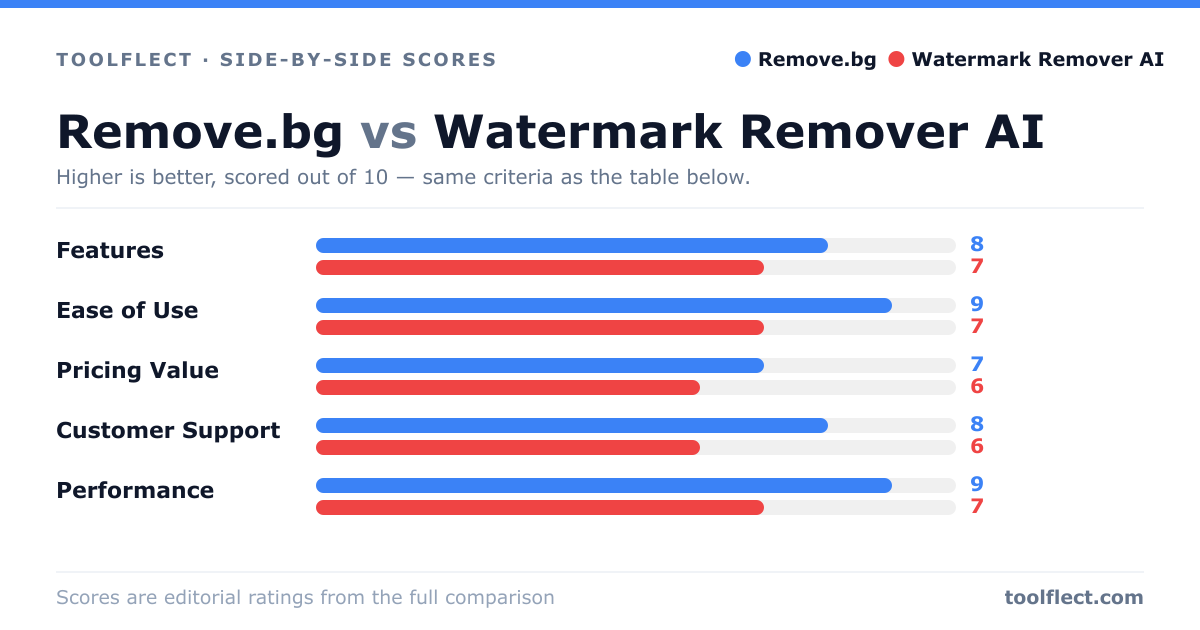
| Criterion | Remove.bg | Watermark Remover AI |
|---|---|---|
| Features | 8/10 – Background removal only, but excellent | 7/10 – Watermark removal, batch processing |
| Ease of Use | 9/10 – Very intuitive | 7/10 – Requires some learning |
| Pricing Value | 7/10 – Free for low-res, credits for high-res | 6/10 – Subscription-based, free trial |
| Customer Support | 8/10 – Responsive email support | 6/10 – Limited support channels |
| Performance | 9/10 – Fast and accurate | 7/10 – Good but slower on complex images |