
Remove.bg vs Clipdrop: Which AI Background Removal Tool Wins?
Overview
Remove.bg and Clipdrop are two popular AI-powered tools for removing image backgrounds. Remove.bg focuses exclusively on background removal, offering fast and accurate results. Clipdrop, developed by Stability AI, provides a broader suite of image editing tools, including background removal, inpainting, and upscaling. This comparison explores their strengths and weaknesses to help you choose the right tool for your needs.
Key Features Comparison
- Background Removal: Both tools excel at removing backgrounds with high accuracy. Remove.bg handles complex edges better, while Clipdrop offers additional refinement options.
- Batch Processing: Remove.bg supports batch processing in its API and desktop app; Clipdrop does not natively batch process.
- Additional Tools: Clipdrop includes image upscaling, relighting, and text-to-image generation; Remove.bg remains focused solely on background tasks.
- API Integration: Both provide APIs for developers. Remove.bg’s API is simpler and more mature.
- Platform Support: Both offer web, desktop (Windows/Mac), and mobile apps. Clipdrop has a more modern interface.
Pros & Cons
Remove.bg
- Pros:
- High accuracy in background removal, especially for portraits and product photos.
- Fast processing with batch processing available.
- Simple API integration for developers.
- Free tier for low-resolution images.
- Cons:
- Limited editing capabilities beyond background removal.
- Watermark on free downloads unless you pay.
- No advanced retouching or creative tools.
- Pricing can be high for heavy usage.
Clipdrop
- Pros:
- Offers a suite of AI tools including background removal, image upscaling, and relighting.
- User-friendly interface with drag-and-drop functionality.
- Real-time collaboration features for teams.
- Generous free tier with daily credits.
- Cons:
- Background removal may be less accurate on complex edges.
- Some features require a subscription.
- Processing speed can be slower for high-resolution images.
- Limited batch processing in free version.
Remove.bg
- Pros:
- High accuracy in background removal, especially for portraits and product photos.
- Fast processing, even for batch uploads.
- Simple API integration for developers.
- Free tier available for low-resolution images.
- Cons:
- Limited customization options for edge refinement.
- Watermark on free downloads unless upgraded.
- No built-in editing tools beyond background removal.
- Pricing can be expensive for high-volume use.
Clipdrop
- Pros:
- Offers a suite of AI tools including background removal, upscaling, and relighting.
- Intuitive interface with drag-and-drop functionality.
- Real-time collaboration features for teams.
- Generous free tier with daily credits.
- Cons:
- Background removal accuracy may vary on complex edges (e.g., hair).
- Requires internet connection; no offline mode.
- Some advanced features are behind a paywall.
- Processing speed can be slower for high-resolution images.
Remove.bg
- Pros:
- Specialized in background removal with high accuracy, especially for portraits.
- Simple and fast API integration for developers.
- Offers a free tier with limited credits.
- Batch processing available in paid plans.
- Cons:
- Limited editing features beyond background removal.
- Can struggle with complex backgrounds or non-human subjects.
- Pricing can be expensive for high-volume use.
- No built-in collaboration tools.
Clipdrop
- Pros:
- Comprehensive suite of AI tools including background removal, upscaling, and relighting.
- User-friendly interface with drag-and-drop functionality.
- Offers a free trial and flexible pricing plans.
- Integrates with other tools like Photoshop via plugins.
- Cons:
- Background removal may be less accurate on complex images compared to specialized tools.
- Some advanced features require a subscription.
- Processing speed can be slower for high-resolution images.
- Limited customization options for background replacement.
Remove.bg
- Pros: Specialized, high accuracy, fast processing, bulk upload, free tier for preview.
- Cons: Limited to background removal, no advanced editing features, pricing can be high for occasional use.
Clipdrop
- Pros: Versatile with multiple AI tools, integrates with Stable Diffusion, clean interface, affordable subscription.
- Cons: Background removal sometimes less precise on intricate details, no batch processing, slower for large images.
Pricing Comparison
- Remove.bg: Free for preview (low-res download). Paid plans start at $0.20 per image (10-pack) or $49/month for 200 images. API pricing is per image.
- Clipdrop: Free tier with watermarks and resolution limits. Pro plan at $9/month (1,000 credits) or $12/month for 2,500 credits. Credits are consumed per operation (e.g., background removal costs 1 credit).
For heavy users, Clipdrop’s subscription offers better value; for occasional usage, Remove.bg’s pay-per-image model may be cheaper.
Best Use Cases
- Remove.bg: E-commerce product photos, profile pictures, batch editing, developers needing a reliable API for background removal.
- Clipdrop: Content creators who need a suite of tools, graphic designers combining background removal with other edits, users on a budget with moderate needs.
Verdict
Both tools are excellent for background removal. Remove.bg wins on accuracy and simplicity, making it ideal for dedicated background removal tasks. Clipdrop offers more versatility and better value for users who need multiple AI features. If background removal is your primary need, choose Remove.bg; if you want an all-in-one creative assistant, go with Clipdrop.
Visual Comparison
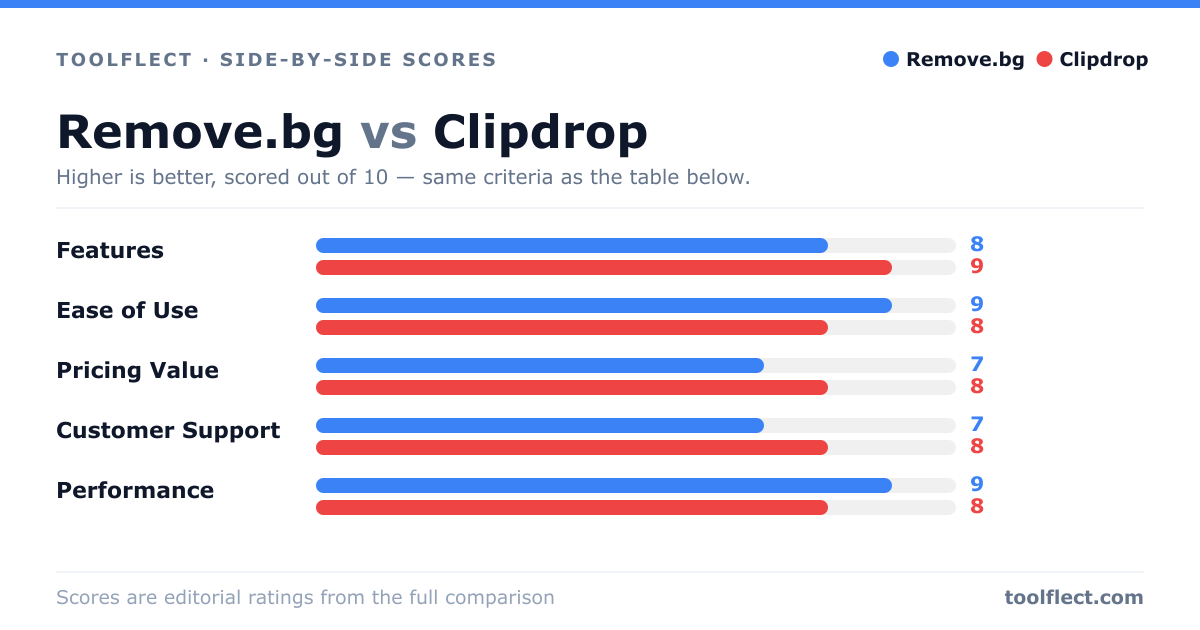
| Criterion | Remove.bg | Clipdrop |
|---|---|---|
| Features | 8/10 – Focused on background removal with API and batch processing. | 9/10 – Comprehensive suite including background removal, upscaling, and relighting. |
| Ease of Use | 9/10 – Simple drag-and-drop interface, minimal learning curve. | 8/10 – Intuitive but more options may overwhelm beginners. |
| Pricing Value | 7/10 – Free tier limited, paid plans can be costly for high volume. | 8/10 – Generous free credits, affordable subscription for full features. |
| Customer Support | 7/10 – Email support, knowledge base, but no live chat. | 8/10 – Email and chat support, active community forum. |
| Performance | 9/10 – Fast and accurate, handles complex backgrounds well. | 8/10 – Good accuracy but slower on large files. |