
Pinecone vs Weaviate: Which Vector Database Should You Choose?
Overview
Pinecone and Weaviate are two leading vector databases designed for AI applications, enabling efficient similarity search and management of high-dimensional vector embeddings. Pinecone is a fully managed, cloud-native service known for its simplicity and high performance. Weaviate is an open-source vector database that offers flexibility and a rich set of features for developers who want more control and customization. This comparison explores their key differences to help you decide which one fits your needs.
Key Features Comparison
- Data Management: Pinecone supports upserts, metadata filtering, and namespacing. Weaviate offers multi-tenancy, cross-references, and built-in object storage.
- Search Capabilities: Both support hybrid search (vector + keyword) and filtering. Weaviate provides more advanced filtering with inverted indexes.
- Scalability: Pinecone auto-scales seamlessly. Weaviate requires manual scaling but offers horizontal scaling with Kubernetes.
- Integration: Pinecone has extensive integrations with LangChain, OpenAI, and Hugging Face. Weaviate also integrates well but has a stronger GraphQL API.
- Open Source: Weaviate is fully open-source (BSD-3-Clause). Pinecone is proprietary.
Pros & Cons
Pinecone
- Pros:
- Fully managed serverless vector database with automatic scaling
- High performance with low latency for production workloads
- Simple API and easy integration with popular ML frameworks
- Built-in metadata filtering and hybrid search capabilities
- Cons:
- Proprietary platform, no open-source version
- Pricing can become expensive at scale
- Limited customization and control over infrastructure
- Vendor lock-in concerns for long-term projects
Weaviate
- Pros:
- Open-source with a strong community and flexible deployment options
- Supports multiple vectorization modules (e.g., OpenAI, Cohere, Hugging Face)
- Advanced features like GraphQL API and hybrid search
- Self-hosted or cloud options provide control and cost predictability
- Cons:
- Requires more setup and maintenance for self-hosted deployments
- Performance may vary depending on infrastructure and configuration
- Documentation can be less polished compared to commercial alternatives
- Scaling requires manual tuning and expertise
Pinecone
- Pros:
- Fully managed serverless vector database with no infrastructure management.
- High performance with low latency and high throughput, ideal for production-scale applications.
- Simple API and SDKs for multiple languages, making integration easy.
- Built-in metadata filtering and hybrid search capabilities.
- Cons:
- Pricing can be expensive for large-scale usage compared to open-source alternatives.
- Limited customization and control over underlying infrastructure.
- Vendor lock-in; migrating data out may be complex.
- Less flexible for advanced users who need fine-tuned configurations.
Weaviate
- Pros:
- Open-source with a free community edition, offering flexibility and no vendor lock-in.
- Supports multiple deployment options: self-hosted, cloud, or hybrid.
- Rich features including vector search, hybrid search, and built-in modules for AI (e.g., generative search).
- Active community and extensive documentation.
- Cons:
- Requires more setup and maintenance if self-hosted, which can be time-consuming.
- Performance may vary depending on deployment and configuration.
- Learning curve steeper for beginners due to more configuration options.
- Cloud offering may lack some features of the open-source version.
Pinecone
- Pros: Fully managed, serverless option reduces operational overhead; excellent scalability with high performance; strong SDK support and integrations.
- Cons: Pricing can be higher for large-scale usage; less flexibility for custom configurations; limited self-hosting options.
Weaviate
- Pros: Open-source with self-hosting flexibility; built-in modules for vectorization and hybrid search; strong community and modular architecture.
- Cons: Requires more setup and maintenance; performance tuning can be complex; documentation may be less polished.
Pinecone
- Pros: 99.99% uptime SLA, zero maintenance, blazing fast queries (sub-10ms), easy setup.
- Cons: Higher cost for large datasets, limited customization, vendor lock-in.
Weaviate
- Pros: Open-source with flexible deployment (cloud, on-prem, hybrid), modular architecture, rich CRUD operations.
- Cons: Steeper learning curve, performance may vary based on configuration, requires DevOps effort for self-hosting.
Pricing Comparison
Pinecone offers a free tier (up to 1M vectors, 500k queries/month) and paid plans starting at $70/month for 5M vectors. Enterprise plans are custom. Weaviate Cloud (WCS) has a free tier (up to 1M vectors, 1M queries/month) and paid plans from $25/month for 1M vectors. Self-hosted Weaviate is free but incurs infrastructure costs. Overall, Weaviate is more cost-effective for small to medium workloads, while Pinecone may be cheaper at scale due to better performance per dollar.
Best Use Cases
- Pinecone: Ideal for production SaaS applications requiring low latency, high availability, and minimal operational overhead. Good for semantic search, recommendation systems, and real-time personalization.
- Weaviate: Best for projects needing deep customization, data sovereignty, or integration with existing systems. Suitable for research, hybrid deployments, and applications requiring complex data models (e.g., graph-like relationships).
Verdict
Both Pinecone and Weaviate are excellent choices, but they cater to different priorities. Choose Pinecone if you prioritize speed, simplicity, and managed service. Choose Weaviate if you value openness, flexibility, and cost control. Evaluate your specific requirements for scale, budget, and in-house expertise before making a decision.
Visual Comparison
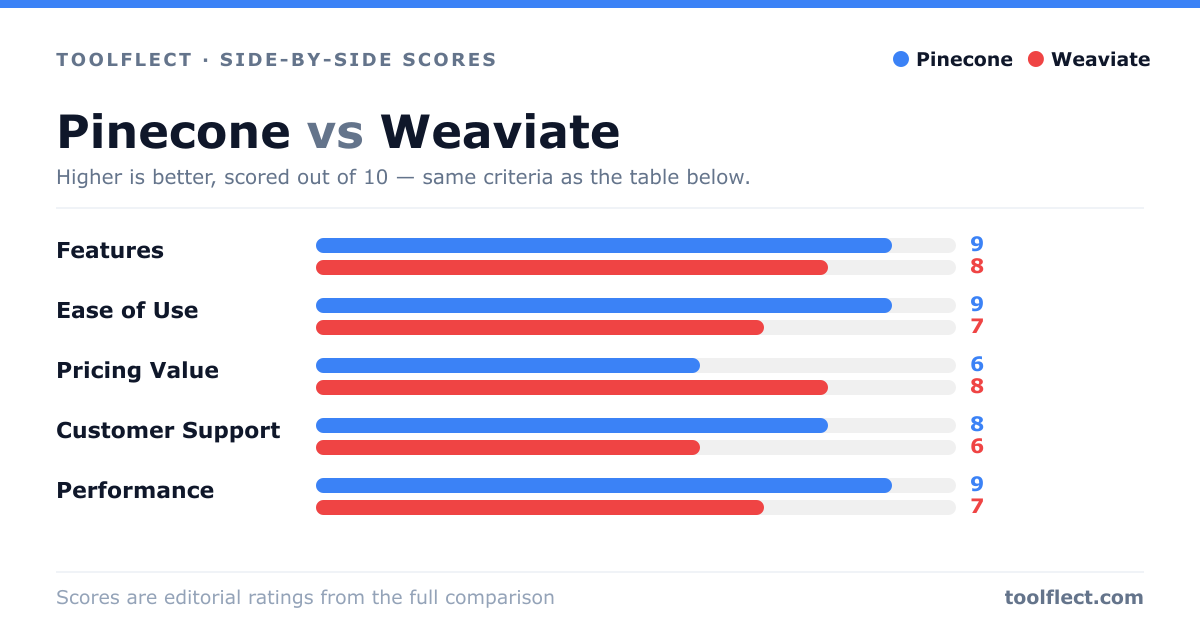
| Criterion | Pinecone | Weaviate |
|---|---|---|
| Features | 9/10 – Rich feature set including serverless, metadata filtering, and hybrid search | 8/10 – Extensive features with GraphQL, modules, and hybrid search |
| Ease of Use | 9/10 – Very easy to start with managed service and simple API | 7/10 – Requires more setup and technical knowledge |
| Pricing Value | 6/10 – High cost at scale, but predictable | 8/10 – Open-source free tier, cost-effective self-hosting |
| Customer Support | 8/10 – Responsive support with enterprise options | 6/10 – Community support primarily, paid support available |
| Performance | 9/10 – Optimized for low latency and high throughput | 7/10 – Good performance but dependent on infrastructure |