
Make vs Zapier AI: Which Automation Tool Wins in 2026?
Overview
Make (formerly Integromat) and Zapier AI are two leading automation platforms that help businesses streamline workflows by connecting apps and automating tasks. While both offer powerful automation capabilities, they differ in approach, pricing, and target audience. This comparison provides an unbiased look at their features, pros and cons, pricing, and ideal use cases to help you decide which tool is right for you.
Key Features Comparison
- Visual Builder: Make offers a highly visual, drag-and-drop interface with a canvas for building complex workflows. Zapier AI has a simpler, more linear interface that is easier for beginners.
- AI Capabilities: Zapier AI includes AI-powered features like natural language processing to create zaps and AI-generated suggestions. Make has introduced AI tools but they are less integrated.
- Integration Library: Zapier boasts over 6,000 app integrations, while Make offers around 2,000. However, Make often provides deeper customization for each integration.
- Error Handling: Make provides advanced error handling and retry logic, which is crucial for complex workflows. Zapier AI has basic error handling but is improving.
- Data Transformation: Make excels in data manipulation with built-in tools for filtering, aggregating, and transforming data. Zapier AI has limited data transformation capabilities.
- Collaboration: Both support team collaboration, but Make offers more granular permissions and version history.
Pros & Cons
Make
- Pros: Visual drag-and-drop builder with infinite canvas; extensive app integrations (2000+); flexible data manipulation with routers and iterators; generous free plan (1000 ops/month).
- Cons: Steeper learning curve for complex scenarios; debugging can be tricky; no built-in AI assistant for workflow creation; performance can lag with large data volumes.
Zapier AI
- Pros: AI-powered automation builder (Copilot) simplifies workflow creation; 7000+ app integrations; robust error handling and monitoring; excellent customer support and documentation.
- Cons: Pricing can get expensive at scale; limited visual customization compared to Make; AI features require higher-tier plans; execution speed can be slower for complex multi-step zaps.
Make
- Pros:
- Visual scenario builder with infinite branching for complex workflows.
- Generous free tier (1,000 operations/month) and affordable paid plans.
- Supports custom webhooks and extensive app integrations.
- Real-time execution and detailed error logs.
- Cons:
- Steeper learning curve for non-technical users.
- No built-in AI model training; requires external AI services.
- Limited pre-built templates compared to Zapier.
- Occasional performance lag with high-volume tasks.
Zapier AI
- Pros:
- AI-powered automation suggestions and natural language creation.
- Huge app directory (over 6,000 integrations) with easy setup.
- Excellent for beginners with intuitive interface and templates.
- Strong customer support and extensive documentation.
- Cons:
- Higher pricing, especially for AI features and premium apps.
- Limited free tier (100 tasks/month) and task limits.
- Complex workflows can become messy and hard to debug.
- AI features still in beta and may not always be accurate.
Make
- Pros:
- Highly flexible visual builder with unlimited branching and complex logic.
- Generous free plan (1,000 ops/month) and affordable paid tiers.
- Supports custom webhooks and extensive app integrations.
- Cons:
- Steeper learning curve for complex scenarios.
- No built-in AI features; requires external AI services.
- Occasional performance lag with large data volumes.
Zapier AI
- Pros:
- AI-powered automation suggestions and natural language creation.
- User-friendly interface with pre-built templates.
- Strong native AI integrations (e.g., OpenAI, Anthropic).
- Cons:
- Higher pricing, especially for AI features.
- Limited free plan (100 tasks/month).
- Complex logic can be cumbersome compared to Make.
Make
- Pros: Highly flexible, visual builder, advanced data handling, cost-effective for high volume, excellent for complex workflows.
- Cons: Steeper learning curve, fewer integrations, interface can be overwhelming for beginners.
Zapier AI
- Pros: Huge integration library, user-friendly, AI-powered features, excellent for beginners and simple automations.
- Cons: Can get expensive at scale, limited data transformation, less control over complex logic.
Pricing Comparison
Make offers a free plan with 1,000 operations per month, and paid plans start at $9/month for 10,000 operations. Zapier AI also has a free plan with 100 tasks per month, and paid plans start at $19.99/month for 750 tasks. For high-volume usage, Make is generally more cost-effective, while Zapier AI may be simpler for small-scale needs.
Best Use Cases
- Make: Ideal for businesses that need complex, multi-step automations with data transformation, such as e-commerce inventory management, CRM enrichment, or custom internal tools.
- Zapier AI: Best for individuals and small teams looking to automate simple tasks like lead capture, social media posting, or email notifications without a steep learning curve.
Verdict
Both Make and Zapier AI are excellent automation tools, but they serve different audiences. If you prioritize flexibility, advanced features, and cost-effectiveness for high volume, Make is the winner. If you value ease of use, a vast integration library, and AI assistance for quick automations, Zapier AI is the better choice. Assess your specific needs and technical comfort to make the right decision.
FAQ
Which is easier to use: Make or Zapier AI?
Zapier AI is generally easier for beginners due to its linear interface and AI guidance. Make has a steeper learning curve but offers more power once mastered.
Can I migrate from Zapier to Make?
Yes, you can manually recreate zaps in Make, but there is no direct migration tool. Many users find it worth the effort for cost savings and advanced features.
Does Make have AI features like Zapier AI?
Make has introduced some AI capabilities, but they are not as integrated as Zapier AI’s natural language processing and AI suggestions. However, Make allows you to connect to AI models like OpenAI for custom automations.
Which tool is better for complex workflows?
Make is better for complex workflows due to its visual builder, advanced error handling, and data transformation capabilities. Zapier AI can handle simple to moderate complexity but may struggle with intricate logic.
Visual Comparison
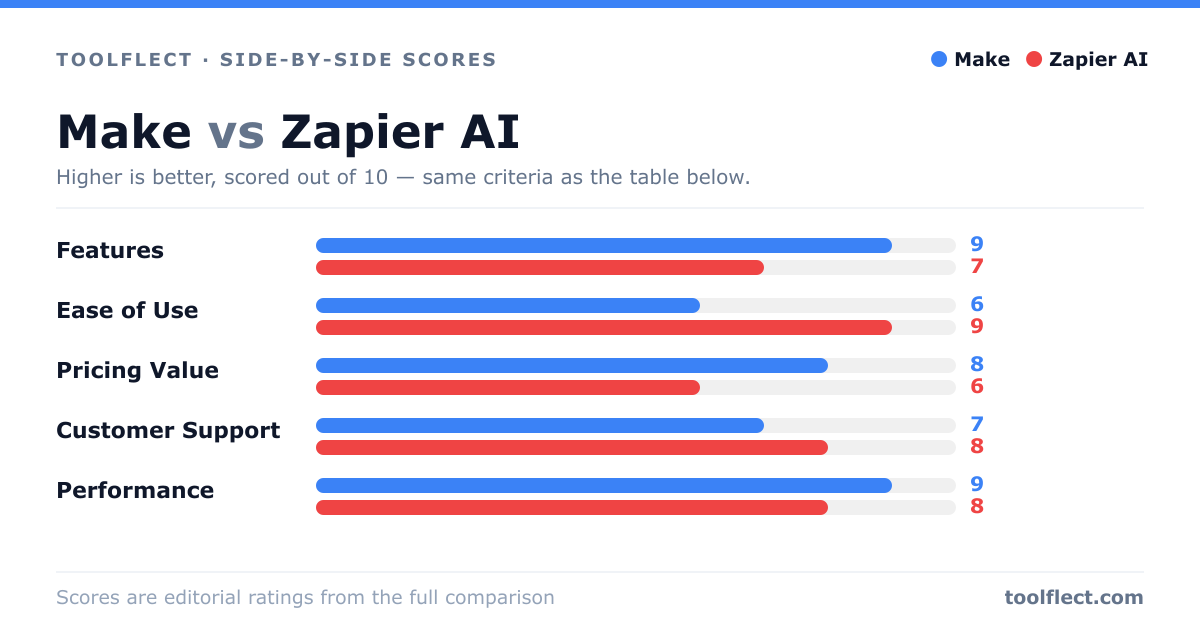
| Criterion | Make | Zapier AI |
|---|---|---|
| Features | 9/10 – Advanced visual automation with routers, iterators, and data store. | 8/10 – AI-assisted automation with broad app support, but less visual flexibility. |
| Ease of Use | 7/10 – Intuitive drag-and-drop but complex for beginners. | 9/10 – User-friendly with AI guidance and templates. |
| Pricing Value | 8/10 – Generous free tier and affordable paid plans. | 6/10 – Higher cost for advanced features and AI. |
| Customer Support | 7/10 – Good support but slower response times. | 9/10 – Excellent support with live chat and extensive resources. |
| Performance | 8/10 – Fast execution for most tasks, but can slow with heavy loads. | 7/10 – Reliable but sometimes slower for complex zaps. |