
Tines vs n8n: Which Automation Tool Wins in 2026?
Overview
Tines and n8n are both powerful automation platforms that help businesses streamline workflows without heavy coding. Tines is a no-code, story-based automation tool designed for security and IT teams, while n8n is an open-source, code-friendly workflow automation tool that offers flexibility for developers. This comparison will help you understand their differences and choose the right one for your needs.
Key Features Comparison
- Workflow Design: Tines uses a visual storyboard interface, while n8n uses a node-based editor.
- Integration Ecosystem: Tines offers 200+ pre-built integrations; n8n has 400+ integrations and supports custom API calls.
- Code Flexibility: Tines is no-code with some JavaScript options; n8n allows custom JavaScript and Python nodes.
- Deployment: Tines is cloud-only; n8n offers cloud, self-hosted, and desktop versions.
- Error Handling: Tines has built-in error handling and retries; n8n provides similar but requires more manual setup.
- Security & Compliance: Tines is SOC 2 Type II, GDPR compliant; n8n offers self-hosting for full control.
Pros & Cons
Tines
- Pros:
- No-code automation with a visual story editor that is intuitive for non-developers.
- Built-in error handling and monitoring, reducing the need for custom solutions.
- Offers a free tier for small workflows, making it accessible for testing.
- Strong security features including SSO and audit logs.
- Cons:
- Limited integration library compared to n8n, especially for niche apps.
- Pricing can become expensive at scale, with higher tiers costing more than n8n’s self-hosted option.
- Less flexibility for complex custom logic; advanced users may find it restrictive.
- Community and third-party templates are fewer than n8n’s.
n8n
- Pros:
- Extensive integration library with over 400 nodes, covering a wide range of services.
- Self-hostable, offering full control over data and lower long-term costs.
- Highly flexible with support for custom JavaScript and complex workflows.
- Active community and marketplace for sharing workflow templates.
- Cons:
- Steeper learning curve for non-technical users due to more complex interface.
- Self-hosting requires maintenance and technical expertise.
- Error handling and monitoring are not as built-in as Tines, requiring additional setup.
- Free tier has limited execution history and no priority support.
Tines
- Pros:
- No-code automation with a visual story editor, ideal for non-technical users.
- Excellent for complex workflows with branching logic and error handling.
- Built-in monitoring and logging for easier debugging.
- Strong security features including SSO and audit logs.
- Cons:
- Limited integration library compared to n8n.
- Pricing can be high for small teams or heavy usage.
- Steeper learning curve for advanced features.
n8n
- Pros:
- Extensive library of 400+ integrations and nodes.
- Self-hosted option provides full control and data privacy.
- Flexible workflow editor with code nodes for custom logic.
- Active community and frequent updates.
- Cons:
- Requires technical knowledge for complex workflows.
- Self-hosting can be resource-intensive.
- UI can be overwhelming for beginners.
Tines
- Pros:
- No-code automation with a visual storyboard interface, ideal for complex workflows.
- Built-in error handling and monitoring for robust automation.
- Supports a wide range of integrations and API calls.
- Scalable for enterprise use with SSO and audit logs.
- Cons:
- Steeper learning curve for non-technical users.
- Pricing can be higher for small teams or startups.
- Limited community support compared to n8n.
n8n
- Pros:
- Open-source with a large community and extensive documentation.
- Self-hostable, offering full control and data privacy.
- Flexible node-based workflow editor with code nodes for custom logic.
- Generous free tier and affordable pricing for scaling.
- Cons:
- Requires technical expertise for complex integrations.
- Self-hosting can be resource-intensive and requires maintenance.
- UI can be overwhelming for beginners.
Tines
- Pros: Intuitive no-code interface, excellent for security operations, strong error handling, good for non-developers.
- Cons: Limited customization, fewer integrations, no self-hosting option, pricing can be high for small teams.
n8n
- Pros: Open-source, highly customizable, extensive integrations, self-hosting option, cost-effective for developers.
- Cons: Steeper learning curve, requires technical skills, UI less polished, error handling can be complex.
Pricing Comparison
Tines offers a free tier with limited runs and paid plans starting at $36 per user/month (annual billing). n8n has a free community edition (self-hosted) and cloud plans starting at $20 per month (annual) for the Starter plan. For large teams, Tines can become more expensive, while n8n’s self-hosted option is cost-effective for those with infrastructure.
Best Use Cases
- Tines: Ideal for security operations (SOAR), IT automation, and teams that prefer no-code solutions.
- n8n: Best for developers and tech-savvy teams needing custom workflows, self-hosting, or integration with niche APIs.
Verdict
Choose Tines if you want a user-friendly, no-code platform with strong security features and are willing to pay for convenience. Choose n8n if you need flexibility, open-source control, and have technical expertise to manage more complex workflows.
FAQ
Can Tines be self-hosted?
No, Tines is a cloud-only platform. For self-hosting, consider n8n.
Is n8n truly free?
Yes, n8n offers a free community edition that you can self-host. Cloud plans have paid tiers.
Which tool is better for non-technical users?
Tines is more accessible due to its no-code interface, while n8n requires some technical knowledge.
Can I migrate workflows from Tines to n8n?
Migration is possible but manual, as the workflow structures differ significantly.
Visual Comparison
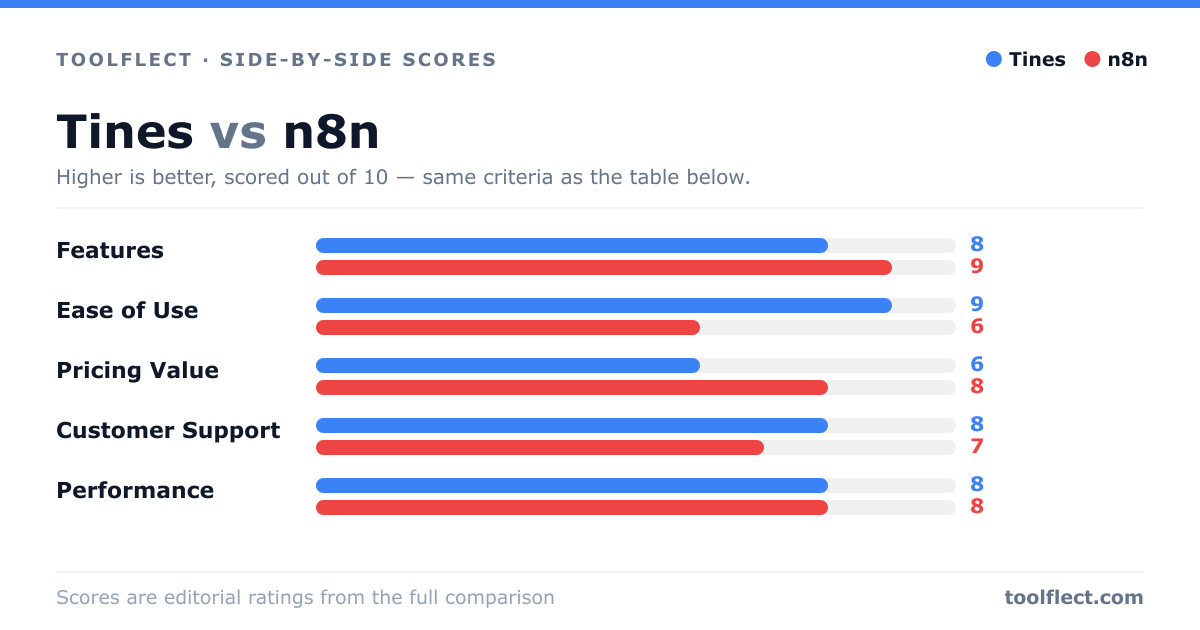
| Criterion | Tines | n8n |
|---|---|---|
| Features | 8/10 – Visual story builder, error handling, but fewer integrations. | 9/10 – Extensive integrations, custom code, but steeper learning curve. |
| Ease of Use | 9/10 – Intuitive for non-developers, drag-and-drop. | 6/10 – More complex, requires technical understanding. |
| Pricing Value | 7/10 – Free tier available, but paid plans can be pricey. | 8/10 – Self-hosted option is cost-effective, but cloud plans add up. |
| Customer Support | 8/10 – Responsive support, but only on higher tiers. | 7/10 – Community support is strong, but official support is limited on free tier. |
| Performance | 9/10 – Reliable and fast execution, minimal latency. | 8/10 – Good performance, but self-hosted depends on your infrastructure. |