
Teachable Machine vs Lobe: Which AI Tool Wins?
Overview
Teachable Machine and Lobe are both no-code platforms that allow users to train custom machine learning models without writing code. Teachable Machine, by Google, is a web-based tool that makes it easy to create image, sound, and pose classification models. Lobe, by Microsoft, is a desktop application that focuses on image classification and offers a simple drag-and-drop interface. Both tools are designed for beginners and educators, but they have distinct differences in functionality, deployment, and user experience.
Key Features Comparison
- Model Types: Teachable Machine supports image, audio, and pose data, while Lobe is primarily limited to image classification.
- Platform: Teachable Machine runs entirely in the browser, requiring no installation; Lobe is a desktop app for Windows and macOS.
- Export Options: Teachable Machine lets you export models as TensorFlow.js, TensorFlow Lite, or an ONNX model for use in various applications. Lobe exports to TensorFlow.js and Core ML, with limited options for other formats.
- Data Handling: Teachable Machine allows for live training from webcam or microphone and can use datasets from folders. Lobe requires image folders for training and does not support live data capture.
- User Interface: Lobe offers a polished, guided interface with automated model selection and training. Teachable Machine has a more straightforward but less automated interface.
Pros & Cons
Teachable Machine
- Pros:
- Free and web-based, no installation required
- Very easy to use for beginners with a simple drag-and-drop interface
- Supports image, audio, and pose classification
- Can export models to TensorFlow.js, TensorFlow Lite, and Coral
- Cons:
- Limited customization of model architecture
- Requires Google account to save projects
- Not suitable for complex or large-scale projects
- Lacks advanced features like hyperparameter tuning
Lobe
- Pros:
- Free and user-friendly with a visual interface
- Automates model training and optimization
- Supports image classification and can export to TensorFlow, Core ML, and ONNX
- Provides detailed training metrics and visualizations
- Cons:
- Only available for Windows and macOS (no web version)
- Limited to image classification (no audio or pose)
- Requires Microsoft account to use
- Less flexible for advanced users
Teachable Machine
- Pros: Free and web-based, no installation required; easy for beginners with a simple drag-and-drop interface; supports image, audio, and pose classification; exports models for TensorFlow, TensorFlow Lite, and Coral.
- Cons: Limited to simple classification tasks; requires Google account and internet connection; less customizable for advanced users; training data must be uploaded, which may raise privacy concerns.
Lobe
- Pros: User-friendly desktop app with a visual interface; automatically selects and trains a suitable model; supports image classification and can export to TensorFlow, Core ML, and ONNX; free to use with no coding required.
- Cons: Only available for Windows and macOS; limited to image classification (no audio or pose); requires local storage for datasets; less flexible for complex custom models.
Teachable Machine
- Pros:
- Free and open-source, runs entirely in the browser
- No coding required; simple web interface
- Supports image, audio, and pose classification
- Exports models to TensorFlow.js, TensorFlow Lite, and Coral
- Cons:
- Limited to simple classification tasks; no object detection or segmentation
- Requires a large number of training samples for accuracy
- No built-in data augmentation or advanced training options
- Model performance may be lower than custom-trained models
Lobe
- Pros:
- Free and user-friendly desktop app for Windows and Mac
- Automates model training and evaluation
- Supports image classification and object detection
- One-click export to TensorFlow, Core ML, and TFLite
- Cons:
- Discontinued by Microsoft (no longer actively developed)
- Limited to image data; no audio or pose support
- Requires installation and may have compatibility issues
- No advanced customization of model architecture
Teachable Machine
- Pros: Free and open to all, works entirely online, supports multiple data types (images, sounds, poses), easy sharing of models via links.
- Cons: Requires internet connection, limited model customization, less guided for beginners compared to Lobe.
Lobe
- Pros: User-friendly desktop app with visual feedback, automates model training, can be used offline after installation.
- Cons: Windows/macOS only, limited to image classification, less flexible for custom export formats.
Pricing Comparison
Both Teachable Machine and Lobe are completely free to use. Teachable Machine is a web-based tool by Google, so there is no cost. Lobe was acquired by Microsoft and remains free for all users. There are no premium tiers or hidden fees for either tool, which makes them highly accessible for educational and hobbyist projects.
Best Use Cases
- Teachable Machine: Ideal for educational projects, interactive art installations, quick prototypes involving image/audio/pose recognition, and when you need flexible model export for web or edge devices.
- Lobe: Best for beginners who want a simple, visual introduction to image classification, offline usage, and when you prefer a desktop app with automatic model selection and training.
Verdict
Both tools are excellent for no-code AI learning, but they cater to slightly different needs. Choose Teachable Machine if you need multi-modal support (images, sounds, poses) and versatile export options. Choose Lobe if you want the easiest possible image classification experience with a polished desktop interface. For most users, Teachable Machine offers more flexibility, while Lobe excels at simplicity. The best choice depends on your specific project requirements and operating system preference.
Visual Comparison
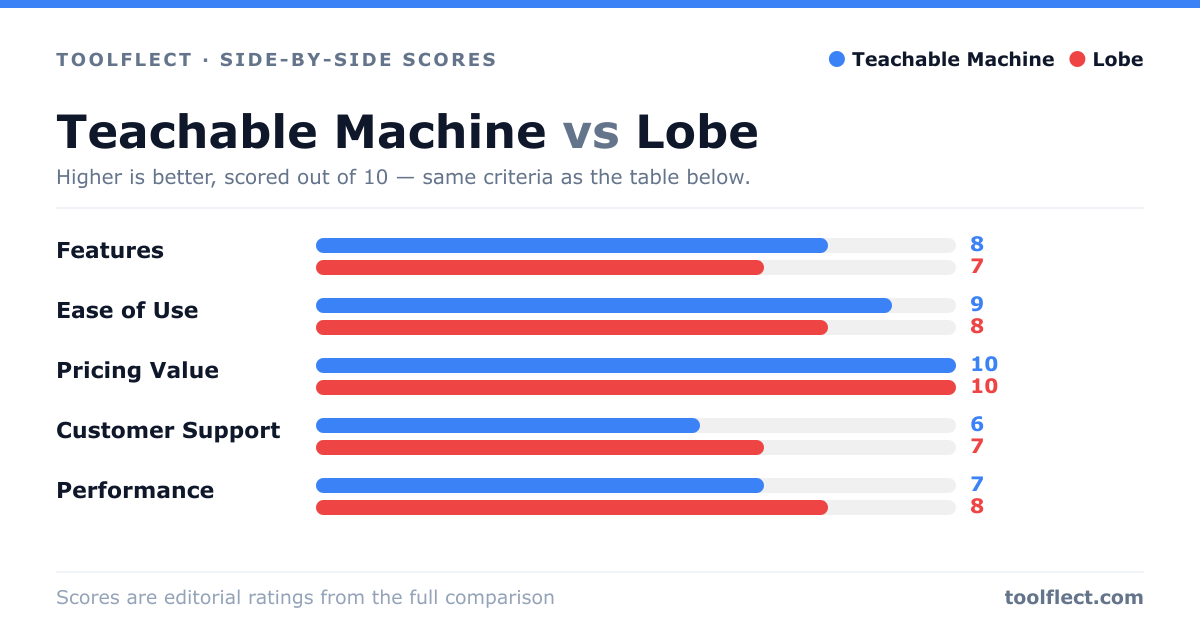
| Criterion | Teachable Machine | Lobe |
|---|---|---|
| Features | 8/10 – Supports image, audio, pose; exports to multiple formats | 7/10 – Only image classification, but includes autoML features |
| Ease of Use | 9/10 – Very intuitive, no setup | 8/10 – Easy but requires installation |
| Pricing Value | 10/10 – Completely free | 10/10 – Completely free |
| Customer Support | 6/10 – Community support, no official helpdesk | 7/10 – Microsoft support, but limited |
| Performance | 7/10 – Good for simple models, but limited control | 8/10 – Automated optimization, better for image tasks |