
Opus Clip vs Vidyo.ai: Which AI Video Tool Wins?
Overview
Opus Clip and Vidyo.ai are two popular AI-powered video creation platforms, but they serve different purposes. Opus Clip specializes in repurposing long-form videos (e.g., podcasts, lectures) into short, engaging clips optimized for social media. Vidyo.ai, on the other hand, offers a broader suite of AI video editing tools, including text-to-video, automatic subtitling, and video repurposing. This comparison explores their key features, pricing, and best use cases to help you decide which tool fits your workflow.
Key Features Comparison
- AI Clip Generation: Opus Clip excels at automatically detecting highlight-worthy moments from long videos and creating multiple short clips. Vidyo.ai also offers clip generation but with less emphasis on highlight detection.
- Text-to-Video: Opus Clip does not have text-to-video; Vidyo.ai provides AI video generation from text scripts.
- Editing Capabilities: Opus Clip offers basic editing within clips (trim, resize, captions). Vidyo.ai includes a full editor with timeline, transitions, and effects.
- Subtitling & Captions: Both offer auto-captions with customization, but Vidyo.ai has more language options and style choices.
- Social Media Integration: Opus Clip directly publishes to platforms like TikTok and YouTube Shorts. Vidyo.ai focuses on export rather than direct publishing.
- Bulk Processing: Opus Clip supports batch processing of multiple long videos. Vidyo.ai processes one video at a time for clip generation.
Pros & Cons
Opus Clip
- Pros:
- AI-powered clipping automatically identifies key moments from long videos.
- Generates multiple short clips with captions and emojis, ready for social media.
- Supports multiple languages and offers a user-friendly interface.
- Provides a free tier with limited credits, ideal for testing.
- Cons:
- Limited customization options for clip editing.
- Export quality may be lower on free plan.
- No built-in collaboration features.
- Pricing can be expensive for heavy usage.
Vidyo.ai
- Pros:
- Offers a comprehensive suite for video repurposing, including clipping, subtitles, and text-based editing.
- Supports multiple formats and platforms, with direct sharing options.
- Advanced AI features like auto-reframing and background removal.
- Flexible pricing plans with a free trial.
- Cons:
- Steeper learning curve due to many features.
- Processing time can be longer for large files.
- Some features are only available on higher-tier plans.
- Customer support response time can be slow.
Opus Clip
- Pros: AI-powered clipping that automatically identifies highlights; supports multiple languages; offers customizable templates and branding; integrates with major platforms like YouTube and TikTok.
- Cons: Limited free plan with watermarked exports; requires a learning curve for advanced editing; occasional inaccuracies in clip selection; no built-in collaboration features.
Vidyo.ai
- Pros: User-friendly interface with quick video repurposing; includes auto-captions and subtitles; offers a variety of aspect ratios for different platforms; has a free tier with basic features.
- Cons: Free plan has limited export quality; fewer customization options compared to competitors; processing times can be slow for longer videos; lacks advanced editing tools.
Opus Clip
- Pros: AI-powered clipping automatically identifies key moments, saving hours of manual editing; seamless integration with social media platforms for direct publishing; user-friendly interface suitable for beginners; offers a free tier with limited features.
- Cons: Limited customization options for clips; output quality may vary depending on source video; no advanced editing features like multi-track audio; pricing can be steep for full access.
Vidyo.ai
- Pros: Advanced AI for precise scene detection and subtitle generation; supports multiple languages and formats; includes built-in video editor for fine-tuning; offers collaborative features for teams.
- Cons: Steeper learning curve due to more complex interface; higher pricing tiers for advanced features; occasional glitches in subtitle accuracy; no free plan, only trial.
Opus Clip
- Pros: Excellent AI highlight detection; time-saving for content repurposing; direct social media posting; clean interface.
- Cons: Limited to clip generation; no text-to-video; fewer editing options; only supports English for captions.
Vidyo.ai
- Pros: Versatile AI video creation (text-to-video, editing); multi-language captions; more advanced editing tools; affordable plans.
- Cons: Clip generation less accurate; no batch processing; steeper learning curve for advanced features.
Pricing Comparison
Opus Clip offers a free tier with watermark and limited credits. Paid plans start at $19/month (Pro) for 40 clips, up to $199/month (Business) for unlimited clips. Vidyo.ai has a free plan with watermark and basic features. Paid plans start at $15/month (Creator) for 30 minutes of video, $39/month (Pro) for 60 minutes, and custom enterprise pricing. Vidyo.ai’s pricing is based on video length, not clips, making it more cost-effective for longer content.
Best Use Cases
- Opus Clip: Best for content creators who regularly produce long-form content (podcasts, interviews, webinars) and need to quickly generate social media clips.
- Vidyo.ai: Ideal for marketers and video editors who need a comprehensive AI video tool for creating short videos from scratch, editing, and adding captions in multiple languages.
Verdict
Choose Opus Clip if your primary need is repurposing long videos into short, viral clips with minimal effort. Choose Vidyo.ai if you need an all-in-one AI video creation platform with text-to-video, advanced editing, and multi-language support. Both tools are strong in their niches, but the right choice depends on your specific workflow.
Visual Comparison
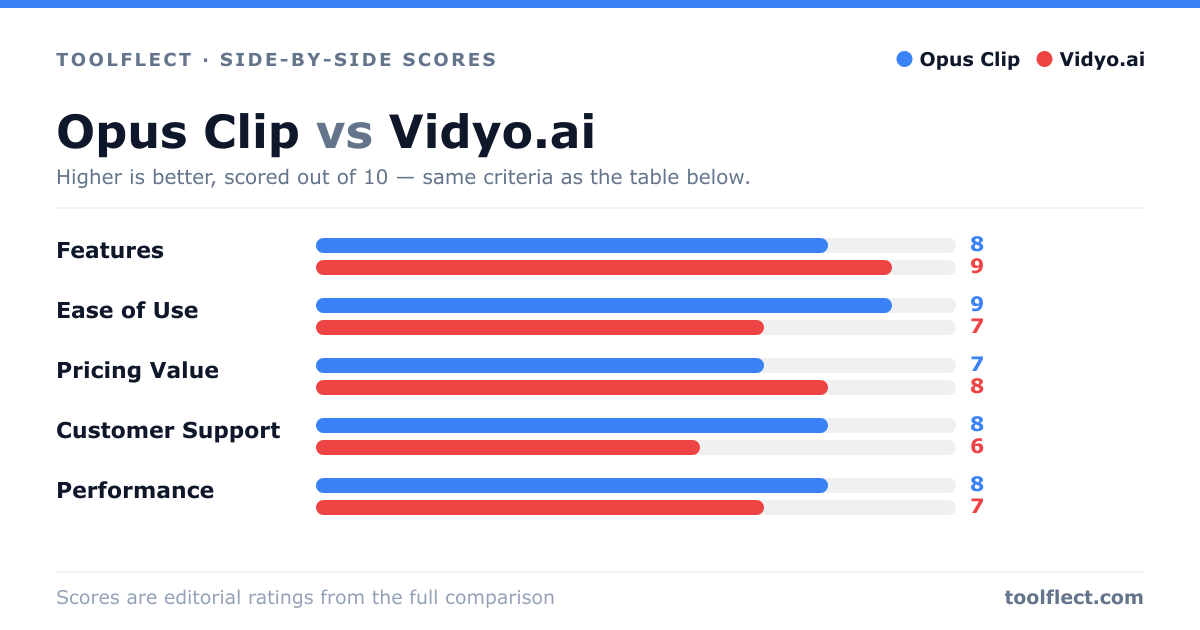
| Criterion | Opus Clip | Vidyo.ai |
|---|---|---|
| Features | 8/10 – AI clipping, captions, emojis | 9/10 – Clipping, subtitles, text-based editing, auto-reframe |
| Ease of Use | 9/10 – Simple and intuitive | 7/10 – Feature-rich but complex |
| Pricing Value | 7/10 – Free tier, but paid plans costly | 8/10 – Competitive pricing with more features |
| Customer Support | 8/10 – Responsive via email/chat | 6/10 – Slower response times |
| Performance | 8/10 – Fast processing, reliable | 7/10 – Good but can be slow on large files |