
Remove.bg vs Clipdrop: Which AI Tool Wins?
Overview
Remove.bg and Clipdrop are two popular AI-powered tools for image editing, particularly known for background removal and image generation. Remove.bg, developed by Kaleido AI, focuses primarily on instant background removal with high accuracy. Clipdrop, by Stability AI, offers a broader suite of tools including background removal, image upscaling, and AI image generation. This comparison will help you understand their strengths and weaknesses to choose the right one for your needs.
Key Features Comparison
- Background Removal: Both tools excel at removing backgrounds. Remove.bg is specialized and offers one-click removal with edge refinement. Clipdrop also provides background removal but as part of a larger toolkit.
- Image Generation: Clipdrop includes AI image generation (e.g., Stable Diffusion) allowing users to create images from text prompts. Remove.bg does not have this feature.
- Additional Editing Tools: Clipdrop offers upscaling, relighting, and other enhancements. Remove.bg focuses solely on background removal and basic editing like blur or color changes.
- API Access: Both provide APIs for developers, but Remove.bg’s API is more mature and widely used.
- Batch Processing: Remove.bg supports batch processing in its paid plans. Clipdrop also allows batch operations but with some limitations.
Pros & Cons
Remove.bg
- Pros: Specialized in background removal with high accuracy and speed; simple drag-and-drop interface; offers API for developers.
- Cons: Limited editing features beyond background removal; free preview is low-resolution; pricing can be high for heavy usage.
Clipdrop
- Pros: Comprehensive suite of AI tools including background removal, image upscaling, and relighting; integrates with other tools like Photoshop; offers a free tier with daily credits.
- Cons: Background removal may require manual touch-ups on complex images; some features require a subscription; performance can be slower on large files.
Remove.bg
- Pros: Fast and accurate background removal using AI; simple drag-and-drop interface; free for low-resolution images.
- Cons: High-resolution downloads require paid credits; limited editing features beyond background removal; no batch processing on free tier.
Clipdrop
- Pros: Offers a suite of AI tools (background removal, upscaling, relighting); integrates with other tools like Photoshop; free tier includes some features.
- Cons: Background removal can be less precise on complex images; pricing can be higher for full access; requires account for some features.
Remove.bg
- Pros:
- Specialized in background removal with high accuracy and speed.
- Simple API integration for developers.
- Free tier available for low-resolution images.
- Cons:
- Limited editing features beyond background removal.
- Pricing can be expensive for high-volume use.
- Requires internet connection for processing.
Clipdrop
- Pros:
- Offers a suite of AI tools including background removal, upscaling, and relighting.
- User-friendly interface with drag-and-drop functionality.
- Provides a free trial and flexible pricing plans.
- Cons:
- Background removal may be less precise on complex images.
- Some advanced features require a subscription.
- Processing time can be slower for large batches.
Remove.bg
- Pros: Extremely accurate background removal, fast processing, simple interface, dedicated to one task.
- Cons: No image generation, limited additional features, pricing can be high for heavy usage.
Clipdrop
- Pros: Versatile with multiple tools, includes AI image generation, good for creative projects, offers a free tier.
- Cons: Background removal may not be as precise as Remove.bg, interface can be overwhelming for beginners, some features require credits.
Pricing Comparison
Remove.bg offers a free tier with low-resolution previews and watermarked images. Paid plans start at $9.99 per month for 50 credits (one credit per image). Clipdrop has a free tier with limited credits and paid plans starting at $9 per month for 100 credits, which can be used across all features. For heavy background removal, Remove.bg might be more cost-effective, while Clipdrop offers more value for a variety of tasks.
Best Use Cases
- Remove.bg: Ideal for e-commerce product photos, profile pictures, and any task requiring quick, accurate background removal without extra features.
- Clipdrop: Best for designers and content creators who need a suite of tools including background removal, image generation, and upscaling in one place.
Verdict
Both tools are excellent, but they serve different purposes. If your primary need is background removal with high accuracy and simplicity, Remove.bg is the winner. If you want a versatile AI image tool that includes background removal and generation, Clipdrop is the better choice. Consider your workflow and budget to make the final decision.
FAQ
Can I use Remove.bg for free?
Yes, Remove.bg offers a free version with limited features. You can download low-resolution images without a watermark, but for full resolution and commercial use, you need a paid plan.
Does Clipdrop have a free trial?
Yes, Clipdrop provides a free tier with a certain number of credits each month. You can use these credits to try out its features before committing to a paid plan.
Which tool is better for batch processing?
Remove.bg has a dedicated batch processing feature in its paid plans, making it easier to handle multiple images at once. Clipdrop also supports batch operations but may require more manual steps.
Can I use these tools for commercial projects?
Both tools allow commercial use, but you need to check their licensing terms. Remove.bg’s paid plans include commercial rights, and Clipdrop’s paid plans also permit commercial use of generated images.
Visual Comparison
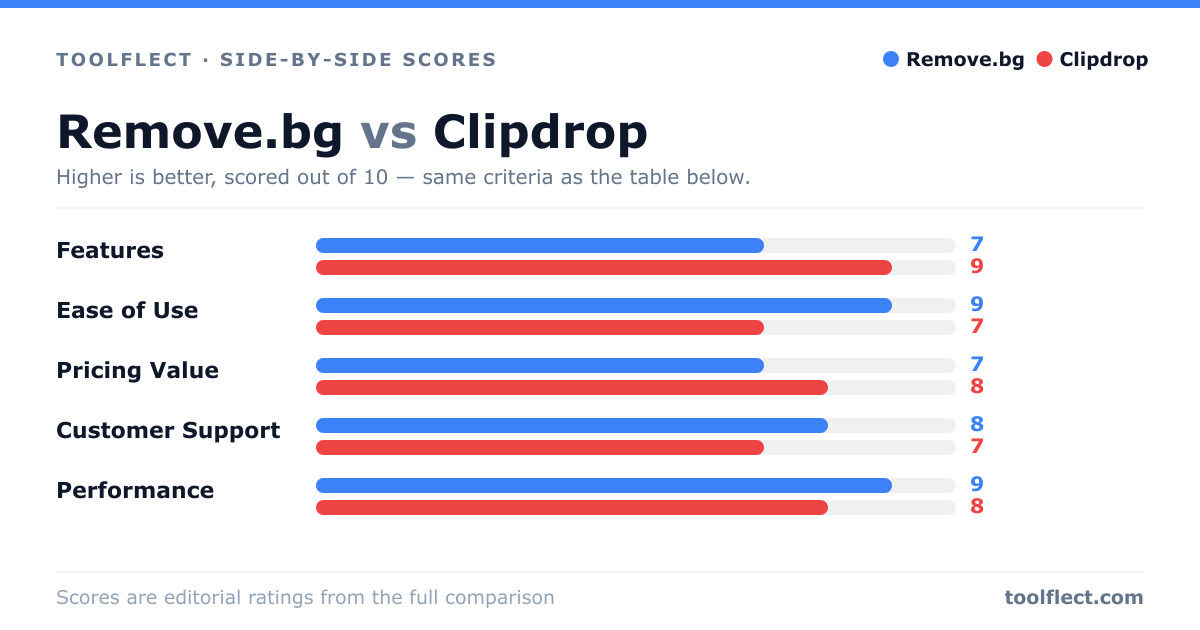
| Criterion | Remove.bg | Clipdrop |
|---|---|---|
| Features | 8/10 – Focused on background removal with API access | 9/10 – Wide range of AI tools beyond background removal |
| Ease of Use | 9/10 – Very simple, one-click background removal | 8/10 – User-friendly but more complex due to multiple tools |
| Pricing Value | 7/10 – Pay-per-image or subscription; free preview low-res | 8/10 – Free tier with daily credits; reasonable subscription |
| Customer Support | 7/10 – Email support, knowledge base | 8/10 – Support via email, community, and tutorials |
| Performance | 9/10 – Fast and accurate for most images | 8/10 – Good but can be slower on large files |