
Microsoft Copilot vs Gemini: Which AI Chatbot Wins in 2026?
Overview
Microsoft Copilot and Gemini are two leading AI chatbots in 2026. Copilot, developed by Microsoft, integrates deeply with Windows and Office, leveraging OpenAI’s GPT-4. Gemini, from Google, is built on Google’s proprietary Gemini models and integrates with Google Workspace. Both offer free and paid tiers, but they cater to different ecosystems and use cases.
Key Features Comparison
- Integration: Copilot excels in Microsoft 365 apps (Word, Excel, Teams) and Windows; Gemini integrates with Google Workspace (Docs, Gmail, Calendar) and Android.
- Multimodal Capabilities: Both support text, image, and voice input, but Gemini has stronger native image generation and analysis.
- Context Window: Gemini offers a larger context window (up to 1M tokens in some versions) vs Copilot’s 128k tokens.
- Real-time Information: Both can access the internet, but Gemini leverages Google Search for more up-to-date results.
- Customization: Copilot allows custom GPTs via Microsoft Copilot Studio; Gemini offers custom Gems.
- Availability: Copilot is available on Windows, web, mobile, and as a standalone app; Gemini is on web, mobile, and integrated into Android.
Pros & Cons
Microsoft Copilot
- Pros:
- Deep integration with Microsoft 365 apps (Word, Excel, Outlook) enhances productivity.
- Strong enterprise security and compliance features.
- Access to GPT-4 and DALL-E 3 for text and image generation.
- Cons:
- Limited free tier; most advanced features require a paid subscription.
- Can be overly cautious with responses due to safety filters.
- Performance can be inconsistent with complex, multi-step queries.
Gemini
- Pros:
- Seamless integration with Google Workspace (Docs, Gmail, Sheets).
- Excellent at leveraging Google Search for up-to-date information.
- Generous free tier with access to Gemini 1.5 Flash.
- Cons:
- Less robust enterprise features compared to Copilot.
- Privacy concerns due to data usage for training.
- Occasional inaccuracies in factual responses.
Microsoft Copilot
- Pros:
- Deep integration with Microsoft 365 apps (Word, Excel, Outlook) enhances productivity.
- Access to GPT-4 and GPT-4 Turbo for high-quality responses.
- Free tier available with basic features.
- Strong enterprise security and compliance features.
- Cons:
- Limited to Microsoft ecosystem; less useful for non-Microsoft users.
- Can be slow at times due to heavy processing.
- Advanced features require a Microsoft 365 subscription.
- Less customizable than some competitors.
Gemini
- Pros:
- Seamless integration with Google Workspace (Docs, Gmail, Sheets).
- Multimodal capabilities (text, image, audio, video) out of the box.
- Strong performance in creative tasks and code generation.
- Generous free tier with access to Gemini Pro.
- Cons:
- Limited to Google ecosystem; less useful for non-Google users.
- Privacy concerns due to data collection for training.
- Advanced features require Google One AI Premium.
- Occasional inaccuracies in factual responses.
Microsoft Copilot
- Pros:
- Deep integration with Microsoft 365 apps (Word, Excel, Outlook) for seamless productivity.
- Strong enterprise features, including data security and compliance certifications.
- Access to GPT-4 and GPT-4 Turbo models, offering high-quality responses.
- Free tier available with basic features.
- Cons:
- Limited availability on non-Microsoft platforms.
- Can be slow to respond during peak times.
- Some advanced features require a paid subscription (Copilot Pro).
Gemini
- Pros:
- Excellent integration with Google Workspace (Docs, Gmail, Sheets) and Android.
- Multimodal capabilities (text, image, audio, video) out of the box.
- Free tier with generous usage limits.
- Fast response times and strong performance on creative tasks.
- Cons:
- Less robust enterprise features compared to Copilot.
- Privacy concerns due to data usage for training.
- Some features are region-locked.
Microsoft Copilot
- Pros: Seamless integration with Microsoft 365; strong coding assistance (GitHub Copilot); reliable and consistent performance; enterprise-grade security.
- Cons: Limited free tier; requires Microsoft ecosystem for full benefits; less flexible for non-Microsoft users.
Gemini
- Pros: Excellent free tier; superior multimodal capabilities; larger context window; better for creative tasks; deep Google integration.
- Cons: Privacy concerns with data usage; less effective in Microsoft-centric environments; occasional inaccuracies.
Pricing Comparison
- Microsoft Copilot: Free tier with limited daily uses; Copilot Pro at $20/month (includes priority access, GPT-4 Turbo, and Microsoft 365 integration).
- Gemini: Free tier with standard features; Google AI Pro at $19.99/month (includes Gemini Advanced, more context, and Google Workspace integration).
Best Use Cases
- Microsoft Copilot: Best for professionals and enterprises heavily using Microsoft 365; developers needing coding help; users who want a reliable assistant for productivity tasks.
- Gemini: Best for content creators, researchers, and students; users who need advanced multimodal features; those already in the Google ecosystem.
Verdict
Both Copilot and Gemini are powerful AI chatbots, but the choice depends on your ecosystem and needs. If you live in Microsoft’s world, Copilot is a no-brainer. If you prefer Google’s services or need advanced multimodal capabilities, Gemini is the winner. For general users, Gemini’s free tier offers more value, while Copilot Pro is better for Microsoft-centric workflows.
FAQ
Which AI chatbot is better for coding?
Microsoft Copilot, especially with GitHub Copilot, is superior for coding due to its deep integration with development tools and strong code generation capabilities.
Can I use both Copilot and Gemini for free?
Yes, both offer free tiers with limited features. Copilot’s free tier has daily usage limits, while Gemini’s free tier is more generous.
Which chatbot has better privacy?
Microsoft Copilot generally offers stronger enterprise-grade privacy and data protection, while Gemini has faced scrutiny over data usage for training.
Do these chatbots support image generation?
Yes, both support image generation, but Gemini has more advanced native image generation and editing capabilities.
Visual Comparison
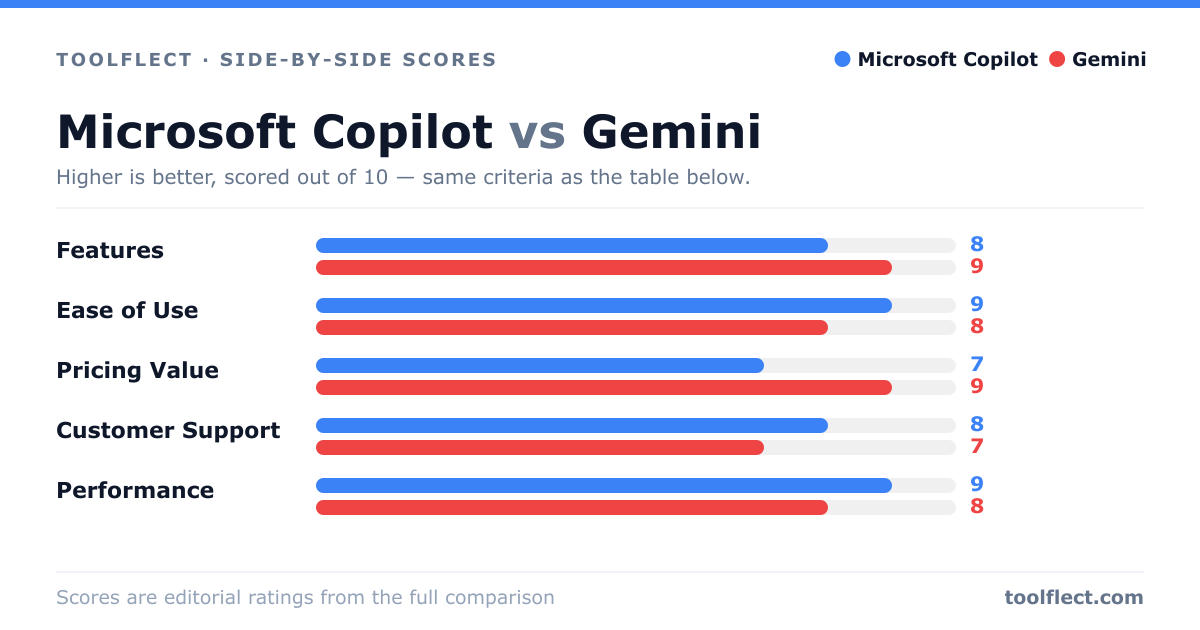
| Criterion | Microsoft Copilot | Gemini |
|---|---|---|
| Features | 9/10 – Deep Office integration, multimodal, plugins | 8/10 – Strong Google ecosystem, real-time info |
| Ease of Use | 8/10 – Familiar interface for Microsoft users | 9/10 – Simple, clean UI, easy for Google users |
| Pricing Value | 6/10 – Expensive for full features | 8/10 – Good free tier, affordable premium |
| Customer Support | 7/10 – Enterprise support, but slow for free users | 6/10 – Limited support, community forums |
| Performance | 8/10 – Fast, but sometimes over-cautious | 9/10 – Quick responses, high accuracy |